
Navigating the technical shifts in Salesforce (Summer 26) release: an architect and developer briefing
Discover the key Salesforce Summer '26 release updates, from User Mode and Apex security to new developer features, and learn how to prepare your team.

As Salesforce continues to mature its platform architecture, each major release brings foundational changes that reshape how technical teams design, build, and secure applications. The upcoming Salesforce v67.0 release (Summer 26) represents one of the most significant architectural updates in recent years.
With database operations moving to User Mode by default, the retirement of legacy security clauses, and the introduction of game-changing Apex syntax updates like native multiline strings and cursor-based pagination, development teams must act proactively.
Whether you are a Salesforce Platform Owner, Technical Architect, or Lead Developer, preparing for these updates is crucial to prevent runtime errors, maintain security compliance, and unlock next-generation performance patterns. Below is a comprehensive guide to what is shifting in v67.0 and how your team can prepare.
1. Apex Security Shifts: User Mode by Default
The most critical architectural change in API v67.0 is the complete inversion of database execution defaults. Historically, Apex executed database queries and operations in System Mode, ignoring user permissions and Field-Level Security (FLS) unless explicitly instructed otherwise.
In v67.0, Apex database operations (SOQL, SOSL, and DML) execute in User Mode by default. Object permissions, sharing rules, and FLS are now automatically enforced at the platform layer unless explicitly overridden.
Any existing Apex classes compiled with API version 66.0 or earlier will retain their legacy behaviour. They will continue to run in System Mode by default and will not enforce CRUD, FLS, or sharing rules unless you explicitly coded them to do so (e.g using WITH USER_MODE or Security.stripInaccessible()). Salesforce does this intentionally so that upgrading an environment to Summer '26 doesn't immediately break your existing production code.
The Retirement of WITH SECURITY_ENFORCED
With this shift, the legacy WITH SECURITY_ENFORCED clause is officially retired. Developers must fully migrate existing codebases to the more robust USER_MODE context. Transitioning to native user mode offers significant technical advantages:

Polymorphic Field Support: Unlike the legacy clause, WITH USER_MODE seamlessly accounts for polymorphic fields such as Owner and Task.whatId.
Full Clause Processing: User mode fully processes all clauses across the entire SOQL statement, including the SELECT and WHERE filters.

Comprehensive Error Telemetry: While WITH SECURITY_ENFORCED stops processing after encountering the first FLS error, WITH USER_MODE identifies all security violations across your query. Furthermore, developers can leverage the getInaccessibleFields() method on QueryException to programmatically inspect the complete set of access errors at runtime.

Implicit DML Contexts and Trigger Behavior
Similarly, DML operations now execute in User Mode by default. However, developers retain granular control and can explicitly declare a target system or user context directly within the DML syntax to maintain absolute control over database transitions.
Apex Triggers also see a nuanced shift in execution logic. Triggers themselves compile without a sharing context and execute in a without sharing mode to ensure background execution isn't blocked. However, in API v67.0+, database operations executed inside a trigger body run in user mode by default. This means that query blocks and DML within a trigger body will automatically override the trigger's without sharing envelope, effectively enforcing a strict with sharing security posture unless system context is explicitly specified.
2. Apex Syntax and Data Processing Highlights
Beyond security updates, v67.0 introduces highly anticipated quality-of-life improvements that eliminate boilerplate code and simplify payload processing for modern enterprise architectures.
Native Multiline String Literals
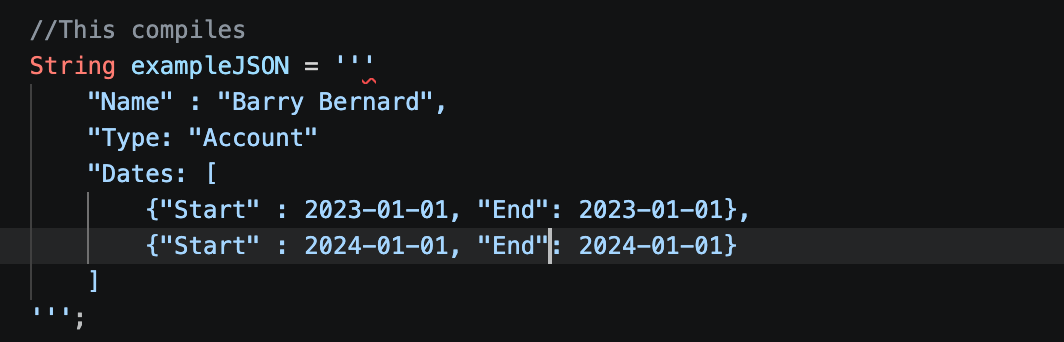
Managing long text blocks, complex email templates, or embedded JSON payloads has historically required tedious string concatenation using operators (+ '\n' +). v67.0 introduces native multiline string support using triple single-quotes ('''). This allows developers to cleanly embed multi-line text, JSON structures, or formatted SOQL blocks directly into their classes without breaking visual formatting or running into syntax clutter.
Native Named String Interpolation
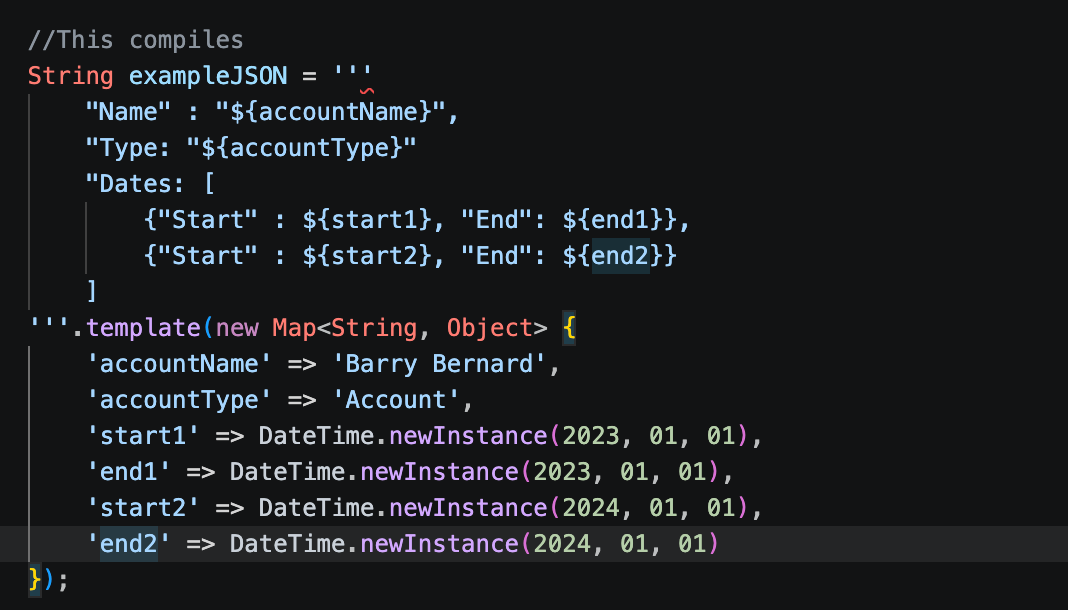
For years, dynamically populating values in strings relied on String.format(), which uses rigid and error-prone positional indexing (e.g., {0}, {1}). The new String.template() engine introduces named string interpolation using standard ${variableName} tokens. This mirrors modern Javascript/Typescript templates, making data formatting more readable, less fragile, and highly maintainable.
3. Programmatic Modernisation: PDF Generation and Constructors
Enterprise applications regularly depend on automated document assembly and invocable actions to drive complex business logic. Version 67.0 standardises these patterns for better reliability and performance.
Programmatic PDF Generation
Generating customised documentation programmatically within core code is heavily streamlined. Developers can now utilise the native Blob.toPdf() method in tandem with the Visualforce PDF Rendering Service. This native approach dramatically simplifies programmatic PDF generation, allowing your team to generate dynamic, heavily branded business documents directly within your backend flows without relying on cumbersome workarounds or third-party overhead.
Every Salesforce environment is different. If you'd like to discuss how these updates could impact your organisation, the Gen25 team is here to help you assess, plan, and confidently navigate the transition.
Ryan Farnaby, Commercial Director UK
r.farnaby@gen25.com
+447368 641599
Joris van Wessem, Account Executive NL
j.vanwessem@gen25.com
+31611274732


