
Beyond the Salesforce UI: what Headless360 changes
Salesforce has always brought functionality closer to its data. Headless360 turns that approach around, making it possible to securely bring Salesforce data, processes and business logic into the tools where employees and AI agents are already working. From Slack and Microsoft Teams to AI assistants, this opens up new ways to interact with Salesforce without always working directly in the Salesforce UI. But what does Headless360 actually mean in practice, and where should organisations start? In this article, Gerbrand Spaans (Principal Consultant at Gen25) explains what Headless360 is, why we believe it’s an important development and how organisations can start exploring its potential with practical, manageable steps.

Life before Headless360
For the past few years, Salesforce has been pushing AI products and capabilities within their platforms. Yet, we did not see many of our clients actively using these features. We would have loved to support them with Model Builder, Einstein Bots, or Case Summaries. We have even implemented these for some. However, these features never really took off. The main reason is, in our experience, these features can be designed to be either easy to set up and just-good-enough, or highly technical and with excellent results. Salesforce focused mainly on the former, with limited ability to give that feeling left after the demos, stalling at questions like “Now what?” or “can we also...”.
Salesforce has always been the company to bring functionality to the data. Service Cloud brought customer questions into the CRM. Reporting and dashboarding brings the insights to where the data is. Experience Cloud brings the customers to where the data is. Chatter and now Slack, allows the conversation to be where the data is. Agentforce and Einstein brought AI to where the data is.
So when Salesforce presented Headless360, most of our clients shrugged and continued with their daily work, without really understanding what it means, or what it does. In this article, we attempt to provide you with that understanding, explain why we think that this is a big deal, and with some practical advice on how to get started.
Very recently Salesforce announced Claudeforce, which seems to be an extension to Headless360 specifically for Claude. This article does not focus on Claudeforce, but we will discuss it soon. Keep an eye out for other blogs.
What is Headless360
First of all, Headless360 is not another Salesforce product or licensing SKU. Instead, it is a framework that allows external applications to connect to Salesforce, and a set of features, new and existing, to make these connections possible. It provides a strong default implementation, and also lets admins and developers add functionality, using the tools they already know, on the platform they already know. Although it spans applications like Slack, Mulesoft and Tableau, we will focus here on the Salesforce features.
Despite the marketing, Headless360 is not all about agents and AI. It provides a broader framework to have, show and manage your Salesforce data outside of Salesforce. It provides your team tools to show for instance, Opportunities in Slack or Cases in Microsoft Teams. Having data in Salesforce no longer means that your employees need to log into Salesforce and click around to see that data. They can still login, but they don’t have to. Instead, they can consume and interact with Salesforce data and processes outside of Salesforce, while still being protected by all the safeguards that Salesforce provides, on your terms.
In that sense, Headless is about turning things around. Instead of bringing the functionality and the people to where the data is, it is bringing the data to where the people are.
As mentioned, there are two sets of features that make up Headless360, one set already exists, and one set brand new. The existing set of features are the APIs, or the interfaces that Salesforce exposes to allow external applications to talk to Salesforce. These APIs let other applications retrieve and change data in Salesforce, such as Accounts, Opportunities or Cases. Salesforce has a rich collection of these readily available, and ways to create new ones using Apex (the procode development tool) or even Flow (for low code solutions). These APIs have been around for as long as we know, and are used by almost all of our customers to both enrich Salesforce as well as the external applications that use them.
The new set of features allows applications to connect in new ways. Firstly, there are the Hosted MCP Servers in Salesforce. MCP (or Model Context Protocol) is a way for AI agents to understand and use the functionalities of another system. The Hosted MCP Servers in Salesforce allow AI agents to understand and use your Salesforce workflows, processes and records securely through Salesforce managed connections. Any customisations and changes made to Salesforce to fit your internal processes can be made available as well, so that the AI can function as an actual employee. The diagram below explains the high level interactions made using API and MCP for integrations:
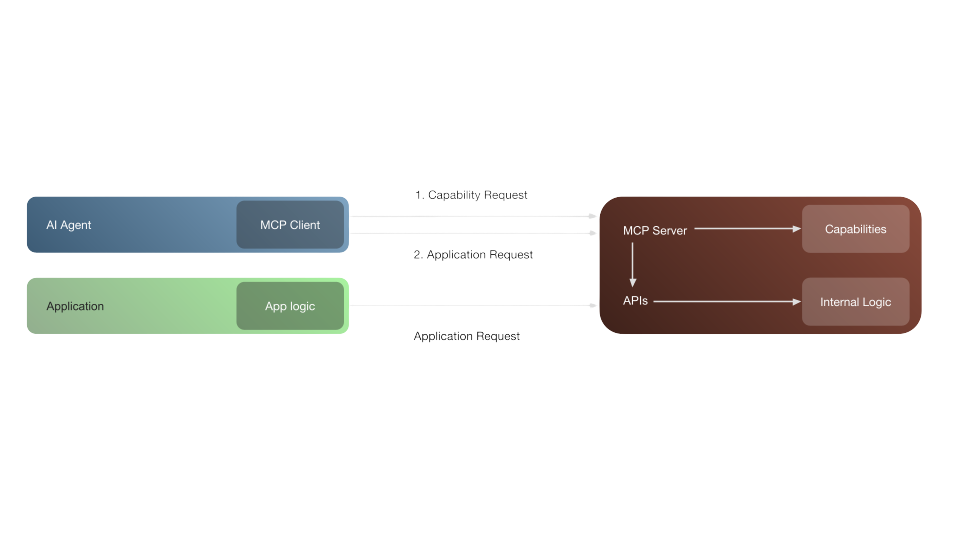
Features including Named SOQL Queries, or logic in Lightning Web Components, can be added to allow reusable logic. This all makes sure that the existing configuration making up your processes in Salesforce can be reused and consumed by external applications.
Lastly, it is important to understand that using Headless360 is not free. Headless360 uses a consumption model where actions performed through MCP count towards Flex Credit Consumption. This means that increased use means increased cost. This is why it is important to focus on creating business value when using Headless360.
Why are we excited about this
We have already performed Headless implementations for clients, where Salesforce serves as a backend for a process, providing the database, the management tool, and business rules for the process. Example implementations range from partner or customer portals to booking websites with integrated payments and more.
Many implementations we work on have the goal to limit the number of applications that employees use during their day-to-day work. Reaching this goal typically includes integrations and data migrations to allow employees to work in Salesforce with external data. Headless360 turns this around. It lets users skip the Salesforce login, allowing users to work from apps that they are already using, such as Slack, Teams or even Claude Code or Microsoft Copilot.
Some of our customers already use the Slack connector to view and discuss CRM records in Slack. This makes it easy to discuss accounts, opportunities or cases with a larger team where everyone has the same context. Users also like the notifications when certain events happen, even though the actions on the data would be performed in the CRM. Now users can have their cake and eat it, by adding actions, skills and other capabilities to applications through the Headless360 functionality.
Implementations where Salesforce is the system of record tended to be very heavy on integrations, which bring value but also complexity. And in any IT landscape, creating full dedicated integrations for each system is more work than creating single dedicated interfaces and having each application connect to these interfaces.
Headless360 provides many of these interfaces and allows AI agents to use them: they log into the CRM and perform the work, without using the UI. All while adhering to the business rules and workflows. Salesforce is already a place where many processes exist, and AI agents are now able to follow these processes, by the rules that you define.
Moreover, setting up Headless360 doesn’t mean rebuilding everything again or from scratch. Instead, you can reuse the existing configuration and processes and large parts of existing flows and logic. It allows both AI agents to do more, all from within the security of the Salesforce platform and removes the need to build complex integrations.
There is a lot of talk that enterprise SaaS is going to be replaced by applications built using AI. Salesforce is feeling the pressure. At Gen25 we don’t believe this will happen any time soon, as these SaaS products will keep providing their value in modern enterprises. However, we do see that the way your employees are working or want to work is already changing. Headless360 allows these changes in work, and allows users to interact with CRM and support data from Salesforce in new ways.
How and Where to Start
The good news is that you don’t need to start a lengthy engagement to get started, all the components are already in place for your team to hit the ground running and to start using Headless360 today. We highly recommend Keeping It Simple and start with small pilots, with simple requests. Test and validate before moving the successful pilots to production.
There are four steps to a Headless360 deep dive. You can take each step at your own pace, where each step already provides value to your company. Also, each step can be made as complex or as simple as required, although -again - we always recommend taking small steps where possible.
- Perform a review of the permission model and process configuration: First of all, since you are connecting external applications and possibly autonomous AI agents to your Salesforce data and processes, it is important to perform a review of the permission model and of the process configuration you will open up as part of the setup. Headless360 directly uses logic in Salesforce. The incoming connections will inherit permissions and roles from their respective users and tap into what is already configured. Make sure the process to be used is up to date and remove any unnecessary permissions to access data or logic.
- Start with a PoC: Don’t focus on building, changing or refactoring. Instead, after the review, start with a small sandboxed Proof of Concept. Your team can activate the necessary MCP Servers and help you connect these to an assistant (Claude, ChatGPT, Copilot or other, as long as the assistant is company approved), which should be quick. Make sure that a whole single workflow is available, then test and validate that workflow in the testing environment. You can start for instance with account search or case summarisation.
- After a successful validation, start adding more functionality. Again, it is not necessary to rebuild, instead, reuse what already exists, in terms of Flows or Apex, and expose this to the agents through the MCP Servers. Adding these capabilities to the MCP Server immediately makes them available to the agents. Again, test and validate to make sure the result is what was expected.
- Monitor the usage, the consumption and the actions taken. Keep an eye on API requests and Flex Credit usage. Make sure that connections through Headless360 are using the proper authentication flows, to ensure accountability and per-user permissions. Setting this up early on prevents surprises later if consumption increases. Remember that costs are consumption-based, so higher usage incurs higher costs. But they should also increase the delivered value. Finally, understanding what agent actions your employees are and are not using, can prioritize future development.
Customer example
One of our customers, a service provider in trading, is setting up Headless360 to allow their AI agents and employees running AI agents to securely access CRM data stored in Salesforce. They are starting out by using the standard, out of the box MCP servers to allow their agents to read data from Salesforce to make informed decisions on how to communicate with accounts or to make informed decisions on how to assist their sales activities. We are planning to add custom capabilities as well, to securely update the CRM data and allow agents to perform work in the CRM.
Together with the customer, we started out with the defaults and are investigating the needs from there. Starting small allowed them to test the waters and assess what their agents require to provide valuable capabilities.
Too many TODOs? We understand this can feel daunting. If your list is getting too long, and you yourself are feeling headless, come drink some coffee with us and find out how we can help you to get more value from your Salesforce data. Reach out to us by clicking here.


